
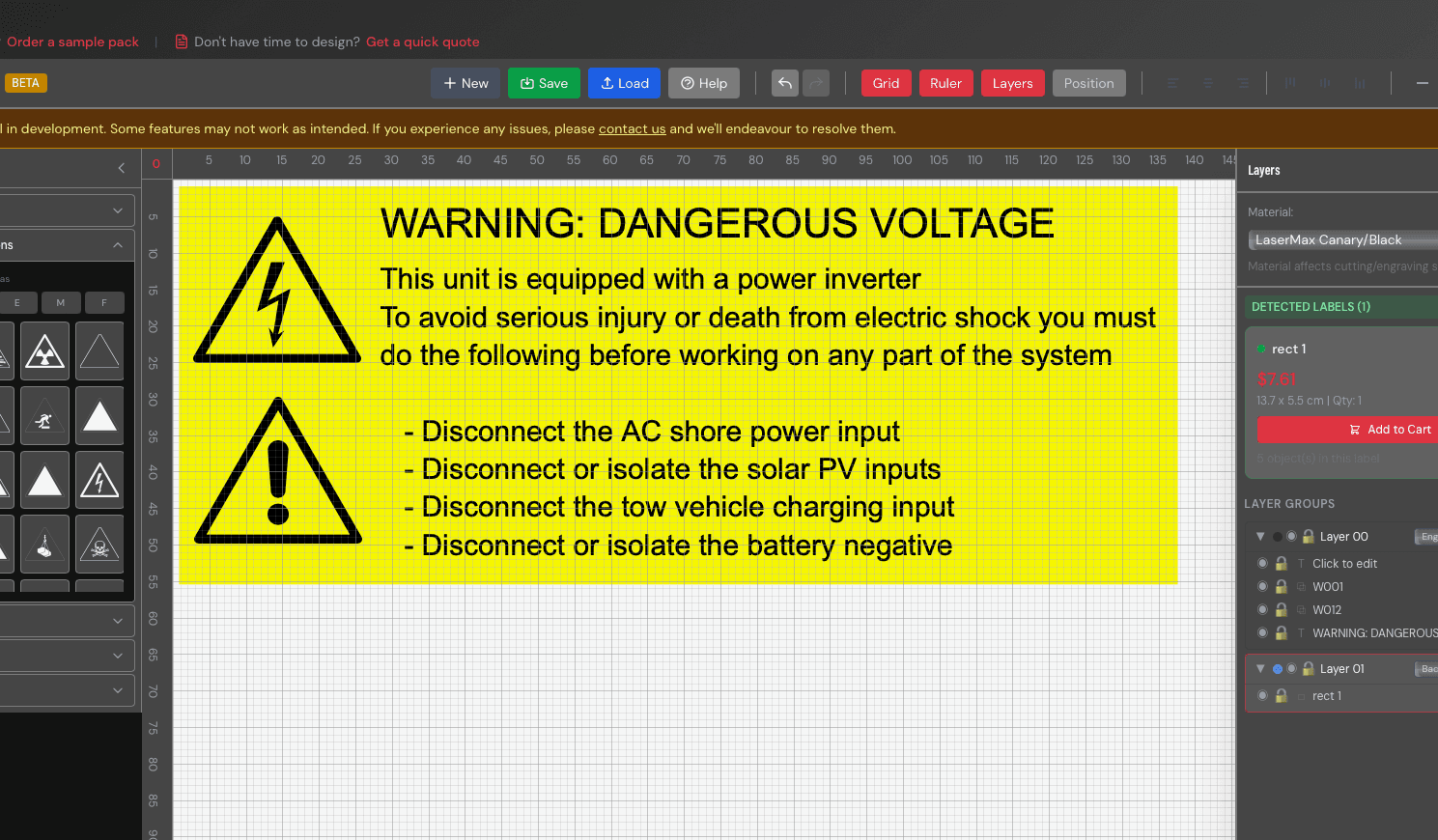
Traditionally, ordering custom labels meant sketching what you wanted on paper, calling a supplier, waiting for a quote, going back and forth on revisions, and eventually placing an order — often without a clear picture of what the finished product would look like. The whole process could take days.
Today, you can design, price, and order custom engraved labels entirely online in minutes. Our Label Designer gives you full control over the design process, with instant pricing that updates as you work.
Step 1: Choose Your Design Method
When you open the label designer, you'll have three ways to create your label:
- Template Mode — Start from a pre-built template. We have templates for common formats like switchboard labels, cable tags, emergency stop labels, tombstone markers, and circular tags. Pick one, change the text, and you're done. This is the fastest option if your label follows a standard format.
- Advanced Mode — A full canvas editor with complete creative control. Add text boxes, safety icons, cutout shapes, borders, and mounting holes. Position everything precisely using grid guides and snap alignment. This is ideal for custom layouts or labels with specific design requirements.
- Upload Your Own — Already have a design? Upload an SVG or DXF file directly. We'll calculate pricing based on the file dimensions and your chosen material. This is perfect if you're working from existing drawings or CAD files.
Step 2: Select Your Material
Material choice affects the look, durability, and cost of your label. Here are the most popular options:
- Traffolyte — The classic choice for engraved labels. A multi-layered laminate that reveals a contrasting colour when engraved. Available in dozens of colour combinations (white on black, white on red, black on yellow, and more). Ideal for switchboard labels, safety signage, and general-purpose identification.
- Acrylic — Available in clear or coloured options. Gives a clean, modern look. Popular for office signage, display labels, and retail applications.
- Stainless Steel — Maximum durability. Corrosion-resistant, heat-resistant, and virtually indestructible. Best for harsh environments: outdoor installations, chemical plants, food processing facilities, and marine applications.
- Brass — A premium, professional appearance. Popular for nameplates, memorial plaques, and heritage-style signage.
- Aluminium — Lightweight and corrosion-resistant at a lower cost than stainless steel. Good for outdoor labels and asset tags where weight matters.
Each material has different thickness options, and the designer shows you available colours and finishes as you browse.
Step 3: Set Your Dimensions
Enter the exact width and height you need in millimetres. There's no minimum or maximum size — we engrave everything from tiny 15mm cable tags to large 300mm+ signage panels.
As you adjust the dimensions, the price updates instantly. This makes it easy to experiment — try a slightly smaller size to reduce cost, or go bigger for better readability. The pricing is fully transparent: you can see exactly what the material, engraving, and any extras cost.
Step 4: Design Your Label
This is where it gets creative. Depending on your mode:
In Template Mode
- Edit the pre-filled text fields
- Change fonts and text sizes
- Adjust mounting hole positions if needed
- Preview the finished label in real time
In Advanced Mode
- Text — Add multiple text boxes. Choose from a range of engraving-friendly fonts. Set size, alignment, and spacing.
- Icons — Insert standard safety symbols (warning triangles, lightning bolts, no-entry signs, etc.) from our built-in icon library.
- Cutouts — Add mounting holes, slots, or custom cutout shapes. Position them precisely using coordinates or drag-and-drop.
- Borders — Add engraved borders or outlines to frame your content.
- Grid and guides — Toggle grid snapping and alignment guides for pixel-perfect positioning.
Design Tips
- Keep text legible — Don't overcrowd the label. White space helps readability, especially at a distance.
- Minimum 3mm text height — Text smaller than 3mm can be difficult to read and may not engrave cleanly on some materials.
- Leave 2mm margins from edges — This ensures nothing is cut off during production and gives the label a clean, professional finish.
- Choose high-contrast colours — White text on a dark background (or vice versa) is always easier to read than similar tones. This is especially important for safety-critical labels.
- Consider the viewing distance — A label read from 2 metres away needs much larger text than one read up close. For switchboard labels typically viewed at arm's length, 5–8mm text height works well.
Step 5: Review and Order
Before adding to your cart, you'll see:
- A realistic preview — The designer renders your label with accurate material colours and engraving depth, so you know exactly what you're getting.
- Exact pricing — No surprises. The price shown is the price you pay.
- Estimated production time — Most labels are produced within 1–3 business days.
- Shipping estimate — We ship Australia-wide via tracked post.
Happy with it? Add to cart. You can design multiple labels in one session and check out everything together.
Saving and Reordering
If you create an account, your designs are saved automatically. This means you can:
- Come back and edit a design later
- Reorder the same label without redesigning it
- Duplicate a design and modify it for a similar label
This is especially handy for businesses that order the same labels regularly — electrical contractors replacing worn switchboard labels, or facilities managers reordering valve tags for new equipment.
Bulk and Trade Orders
Ordering more than a handful? Our plans include credits and discounts that can significantly reduce the per-label cost on larger orders. For very large projects (100+ labels), contact us directly for trade pricing.
Get Started
Ready to design your first label? Head to the Label Designer and start creating — no account required to design and get a price. It takes about 60 seconds to go from blank canvas to a finished, priced label ready for production.